


iPhone
Since 1991 I use pda's and since 1994 mobile phones. Since 2005 I use
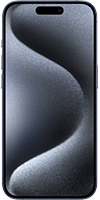
a smartphone which combines both. After a  Palm Treo 650 I used an iPhone 3GS, iPhone 4, iPhone 4s, iPhone 5, iPhone 5s, iPhone 6, iPhone X, iPhone 12 Pro and since 2023 an iPhone 15 Pro.
On this page I would like to talk about a few quirks and missing functions, as well as tips for the usage.
Bluetooth
| Profile | Short | Usage | Sample Products |
|---|---|---|---|
| Advanced Audio Distribution | A2DP | Audiotransfer | Audioplayer, Headphones, Micro |
| The Advanced Audio Distribution Profile supports the transmission of stereo audio data between two devices, e.g. between a pc and a headset. There are two different roles within this profile - one unit is the source (A2DP-SRC) and the other one the sink (A2DP-SNK). | |||
| Audio Video Remote Control | AVRCP | Audio/Video Remote Control | PC, VCR, DVD-Player |
| The Audio Video Remote Control Profile enables mobile
Bluetooth devices to act as a remote control for audio- or video devices. Instead of a simple remote
control unit the controler may also be a pc, mobile phone or pda. There are two different roles
within this profile - one unit is the controler (AVRCP-CT) and the other one the target (AVRCP-TG).
AVRCP support in the iPhone is limited to pause/play/stop prior to iOS 4.1 | |||
| Hands Free | HFP | In car telephony | Phone, Hands free kit |
| The Hands Free Profile supports the use of a car kit. It manages the communication between a car kit and a mobile phone via Bluetooth. There are two roles in this profile. The car kit is called HF-Unit while the mobile phone is called HF-Audio Gateway. | |||
| Headset | HSP | Headset voice output | Headset |
| The Headset Profile supports the usage of wireless headsets, e.g. sound input and output for a mobile phone or VoIP calls with a computer. The possible quality is only sufficient for speech. For music the A2DP profile is used. There are two roles in this profile. The headset is called Headset-Headset while the opposite unit is called Headset-Audio Gateway. The Headset Proile uses services of the Serial Port Profile (SPP). | |||
| Human Interface Design | HID | Inputs | Keyboard, Mouse, PC |
| The Human Interface Device Profile supports the wireless
use of input devices like mice, keyboards or joysticks. There are two roles in this profile. Input
devices are called HID-Client and receivers as HID-Unit. HID support was introduced to the iPhone in iOS 4.0. | |||
| Message Access Profile | MAP | Message exchange between devices | Phone, Car Kit |
| The Message Access Profile supports exchange of messages
between devices. Mostly used for automotive use where an on-board device (typically a
hands free car kit) can exchange messages with another device (typically a mobile phone). MAP support was introduced to the iPhone in iOS 6.0. | |||
| Personal Area Networking | PAN | Network connection | Access Point |
| The Personal Area Networking Profile supports networks in personal areas. Through these ad-hoc networks up to eight devices can exchange data. Devices like harddisks, internet access or printers may be used like in local networks (lan). There are two different roles. A PAN-Access Point can provide a network access to other Bluetooth devices which are called PAN users or act as a master in a PAN group. This network can consist of up to seven PAN users via a PAN-AP. Two PAN users may otherwise connect directly with each other without a PAN-AP. | |||
| Phonebook Access Profile | PBAP | read phonebook | Phone, Car Kits |
| The Phonebook Access Profile supports read access to a mobile phone's phonebook for other devices. | |||
The Bluetooth implementation in the iPhone is quite rudimentary and only supports the
profiles mentioned above. Here you will find Infos about all Bluetooth profiles.
Calendar
The Calendar in the iPhones looks great at first sight but lacks some major features while using:
- No feature go to date
- No calendar week shown
- Tasks from iCal are not synced
- The category colors are not synced from iCal
- No copy & paste
- In the monthly view every day with an appointment is shown with a grey point instead of the correct category color
All of the above functions are supported by the app  Week Calendar.
Notes
The simple Notes app in the iPhone has only basic functions. As
an alternative I use Notebooks which adds a lot of features and
syncs via WebDAV with the computer. There is also a macOS application for this.
SIM Lock/Netlock
To offer mobile phones at decent prices mobile service
providers subsidize them and get their return on pricy contracts - Rockefeller did that before.
To ensure the mobile phone earns its money it's protected with a SIM lock (works only with a SIM card
from the mobile service provider) or netlock (works only in the mobile network of the provider).
On the iPhone this protection is quite sophisticated and may only be deactivated by Apple on request
of a mobile service provider. The removal is then processed at next syncronization with iTunes. In
Germany this can be done e.g. after 24 months online by Telekom. In the form one
can also see when the removal can be done. Often iPhones are offered with a supposed Telekom
netlock. If one wants to used that phone within the Telekom network with a discounted
Congstar card one will be out of luck. Out of unknown reasons the card is accepted by the
iPhone but the phone doesn't work. So it's de facto kind of a SIM lock.
Visual Voicemail
If one uses the iPhone with a mobile service provider supporting this feature one can use this comfortable notification of incoming messages called Visual Voicemail by Apple. Please have in mind that sometimes the provider has to know, an iPhone is used to enable this option. Important is hereby the provider and not the network.
Screenshot
A screenshot can be taken by holding the home button and clicking the on/off key at the same time. The produced JPEG picture is saved in Photos and transmitted at next sync.
Deactivating Touch ID
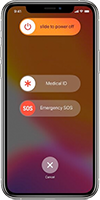 Touch ID or Face ID can be quickly
disabled since iOS 11 by pressing the power button and one of the volume
buttons simultaneously until a screen with three sliders appears. This can be useful to prevent the
forced unlocking by third parties. Alternatively, one can turn off the iPhone.
Touch ID or Face ID can be quickly
disabled since iOS 11 by pressing the power button and one of the volume
buttons simultaneously until a screen with three sliders appears. This can be useful to prevent the
forced unlocking by third parties. Alternatively, one can turn off the iPhone.
Emergency SOS
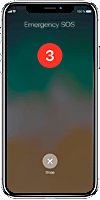 The
emergency call is activated by pressing the power button five times. A countdown counts from five to
zero. Then the local emergency number is called. If one has stored emergency contacts on the iPhone,
they will be automatically notified by text message including the current location after the
emergency call. However, this can be deactivated.
The
emergency call is activated by pressing the power button five times. A countdown counts from five to
zero. Then the local emergency number is called. If one has stored emergency contacts on the iPhone,
they will be automatically notified by text message including the current location after the
emergency call. However, this can be deactivated.
Net monitor
The net monitor can be activated by entering ✱3001#12345#✱ (green handset).
Tethering
Using the iPhone as a data modem via USB or Bluetooth is called Tethering by Apple. This may be activated since iOS 3.1.3 for unlocked iPhones.
5G
The iPhone 15 Pro
supports 5G on many worldwide used frequencies
(1/2/3/5/7/8/12/14/20/25/26/28/29/30/38/40/41/48/53/66/70/71/77/78/79/258/260/261). Learn more
about all 5G frequencies worldwide.
LTE
The iPhone 15 Pro supports LTE on nearly all worldwide used frequencies
(1/2/3/4/5/7/8/12/13/14/17/18/19/20/25/26/28/29/30/32/34/38/39/40/41/42/46/48/53/66/71). That
wasn't always self-evident. E.g. the iPhone 5 worked
in Germany only within the Telekom network due to its supported frequency bands 1 (2100 MHz), 3 (1800 MHz) and 5
(850 MHz).
Learn more about all LTE frequencies worldwide.
VoLTE
Since the iPhone 6 and iPhone 6 Plus VoLTE is
supported. Thus the smartphone stays in the LTE network also for voice calls while older iPhones had
to revert to 3G or 2G.More information about VoLTE
Wirless Charging
Since the iPhone 8, iPhone 8 Plus and iPhone X wireless charging is supported.
Find out
more about the used wireless charging standard Qi.
Activation Lock
iPhones may be secured with an activation lock. Without
identifying with ones Apple ID it is impossible to deactivate "Search my iPhone" on the
device, to logout of iCloud and to delete or activate the device. Thus a stolen iPhone is pretty
useless for thieves.
Since iOS 8 the activation lock is
activated by default. On iOS 7 one has to activate it.
Service & Support
The Service and Support coverage may be checked on the Support-Homepage
of the manufacturer with the devices serial number. this may be checked on an iPhone at
Preferences > General > Info and on the Mac in the system report. Apple shows the following
information:
- Valid Purchase Date
- Availability of free telephone technical support
- Repairs and service coverage
iPhoto
Does iPhoto open each time the iPhone is connected? This may be
switched off/on but it's not within the prefs of iPhoto or iTunes as one might
expect but hidden in the program Digital Photos. Hidden is more or less literal as the
function lies in the lower left corner behind the  icon. Here one may choose if and which program opens when a
device with pictures is attached. This may be a camera, drive or storage card.
icon. Here one may choose if and which program opens when a
device with pictures is attached. This may be a camera, drive or storage card.
SMS > England
If SMS to +447537410230, +447537410280 or +447537410200 appear on your cellphone's monthly bill these are caused by the iPhone sending them automatically at each activation and deactivation of Facetime or iMessage. There is a discreet note from Apple at the activation prompt about this behavior.
Maintenancemode
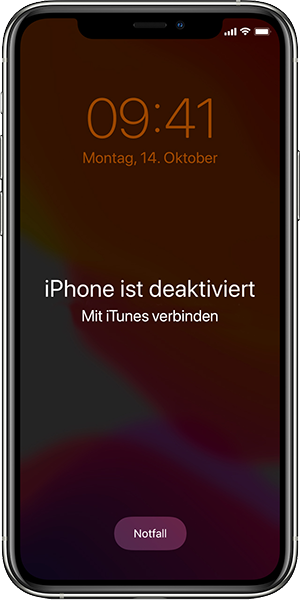
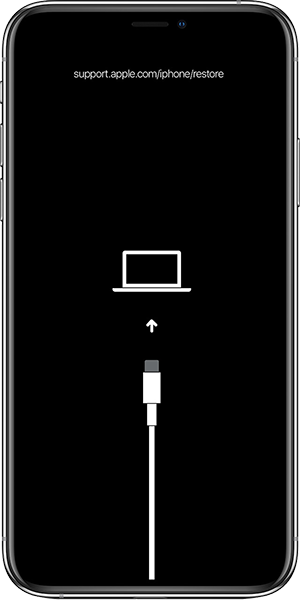 If
for example, you have entered an incorrect password too many times and ignored all warnings, the
iPhone will only show at startup that it is disabled and you should disabled and that you should
start iTunes. Starting with macOS Catalina, however, there is no iTunes at all, which is a bit
irritating. To activate the recovery mode, simply open the Finder and connect the iPhone as directly
as possible to the computer. For iPhones without a home button press the volume up button, then the
volume down button and then press the standby button until the device restarts. Continue to hold
down the standby button until the device is in recovery mode.
If
for example, you have entered an incorrect password too many times and ignored all warnings, the
iPhone will only show at startup that it is disabled and you should disabled and that you should
start iTunes. Starting with macOS Catalina, however, there is no iTunes at all, which is a bit
irritating. To activate the recovery mode, simply open the Finder and connect the iPhone as directly
as possible to the computer. For iPhones without a home button press the volume up button, then the
volume down button and then press the standby button until the device restarts. Continue to hold
down the standby button until the device is in recovery mode.
Diagnosis
Apple offers diagnostic tools to detect defects
on iPhones from iPhone 12 onwards. To use these tools, the iPhone must be
switched off. Then the volume up and down buttons have to be pressed
simultaneously, and the iPhone has to be connected to a charger. When the Apple
symbol appears, the buttons can be released and the iPhone boots into a
diagnostic mode. Now, Apple's Diagnosis Tool
can be opened in a browser on another device. Since Apple only offers this
service in countries where they are legally obligated to support repairs, in
other countries this requires a VPN-connection into a supported country (e.g. USA). Now,
one can test the iPhone's hardware with various tests. This is useful in the
event of defects or when buying used iPhones.
Modelnumber
The model number of an iPhone tells you what kind of device it is.
You can find it under Settings > General > About. The first letter of the model number means the
following:
- M - Device purchased brand new from Apple or an authorized reseller
- F - Gerät, Device that has been refurbished at Apple or a mobile service provider
- P - Gerät, which was individualized brand new with engraving
- N - Gerät, which was provided as an exchange for a defective iPhone
 Back to main page